Darky's Fake Chestplate
Darky's Fake Chestplate gives leather, chainmail, copper, iron, gold, diamond and netherite chestplates an Elytra-style client visual with fake flight, rocket animation, optional enchant visuals and an in-game settings GUI.
1.21.11
How Darky's Fake Chestplate works.
Open /fakechestplate to enable Fake Mode, choose the chestplate type and toggle Unbreaking III + Mending visuals. The normal Minecraft Controls menu also contains the configurable menu keybind.
The feature is client-side and licensed through DarkyDev Services. The server still owns the real item and authoritative player state.
A closer look.
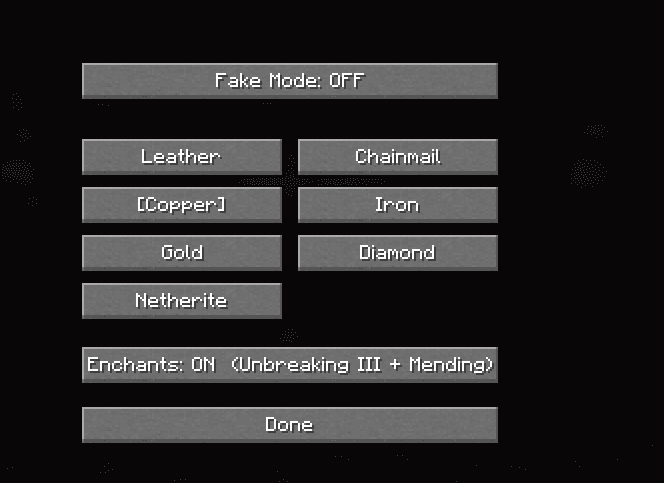
Fake Chestplate settings GUI
Select the chestplate type, toggle Fake Mode and control the optional enchant visuals from one in-game menu.
/fakechestplateWhat it does
- ✓Seven chestplate types
- ✓Fake Elytra flight and rocket visuals
- ✓In-game GUI plus Controls keybind
- ✓Optional Unbreaking III + Mending visuals
- ✓DarkyDev licensed customer access
What it does not do
Client-side visual/flight simulation. It does not replace the server-authoritative chestplate or grant server-side Elytra permissions.
Server rules and third-party platform rules still apply.
For another payment method or any product issue, open a ticket in the DarkyDev Discord.
Support